Saturday, September 27, 2008
How to Get Videos on to Your iPod
I thought I'd share this. I recently got an iPod Touch (My dad's brilliance in a golfing tournament) and realized I have SO many videos I want on it. I will cover two different ways through two different steps.Getting the Videos
1. From Youtube video
- Grab the URL link to the video you want
For instance: http://www.youtube.com/watch?v=Db7bt6YzZyo (which I uploaded, by the way)
- Go to Keep Vid and enter the URL in the bar at the top
- Click "Download"
- Scroll down and for -Video.mp4-, right click and "Save Target As"

- Save your video somewhere. This shouldn't take too long.
2. From a video on your computer
This is if you have videos on your computer that isn't in the mp4
- If you do not already have a video format converter, download this. It is free and it does not watermark any of the videos you want it to convert
- Run the program after you have downloaded + installed it.
- Click "Add Files"

- Select the appropriate file you want to convert
- Wait a few seconds. If a box pops up with a bunch of question marks, just click "OK"
- Another (more normal-looking) window will pop up. Click "Next"
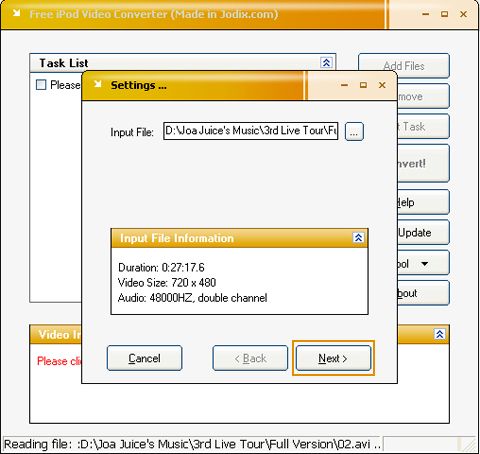
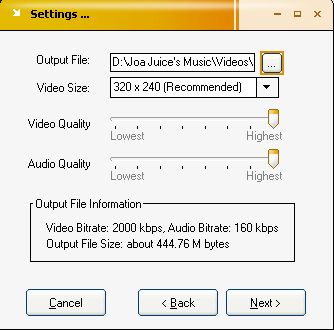
- Click the little orange box next to the "Output File" line. Name it whatever you like and save it somewhere you will remember
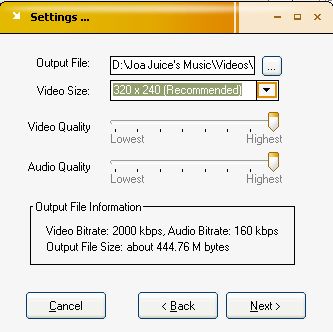
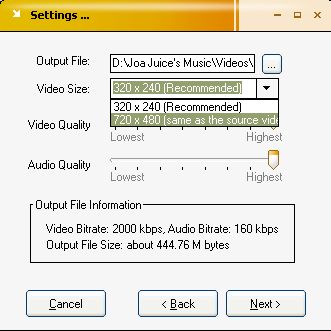
- Click the little triangle next to and select the choice of "same as source video"
- Make sure the two bars for "Video Quality" and "Audio Quality" are at the highest.
- Click "Next"
- It doesn't really matter what the tag name is. Click "Okay"
- Add all your files like this and the click "Convert"!

- Another window will pop up. Click "Hide to Tray". This may take a while.
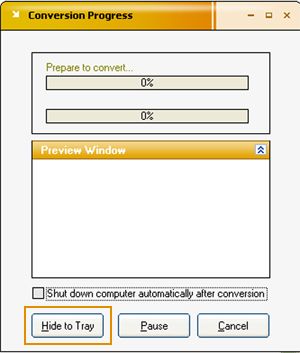
- A message bubble will pop up when all your conversions are done. You may choose to check the output file or something
Putting the Videos in Itunes
This is only if your iTunes is being annoying and won't open your MP4 (make sure your video is in this format) directly (by clicking it and making it "open in iTunes")
- Open your iTunes

- Click File >> Add Files to Library or tap 'Ctrl-O' on your keyboard.
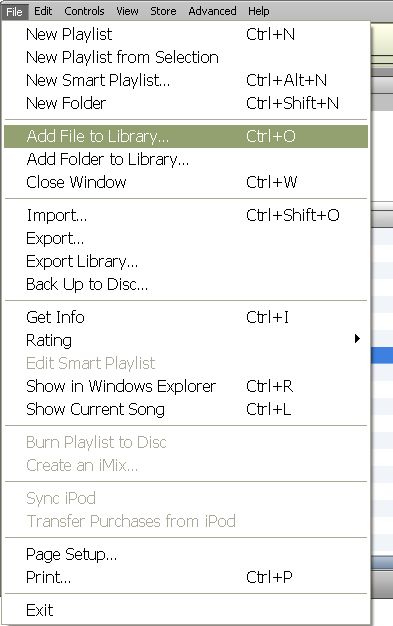
- Find the files you want and add!